Partial Prerendering (PPR)
PPR is the ultimate rendering optimization. It pre-renders the static shell of your page at build time and streams dynamic content into 'holes' as soon as it's ready.
In this experimental build, PPR defaults to Dynamic Streaming. Refresh to see the server-side time update.
Strategy
Evolutionary Path: Introduced as experimental in **Next.js 14**, refined in **v15**, and now fully integrated with the **Cache Components** model in **v16**. See our [Migration Guide](./NEXTJS_16_MIGRATION.md) for build details.
Hydration
Server sends finished HTML. Browser 'hydrates' it for interactivity.
Cold start. No cache exists yet.
Architectural Insights
Hover over headers to reveal
Infrastructure Lifecycle Data.
Use the timeline buttons at the top to simulate how headers evolve over time in a production environment.
The PPR Evolution: v15 vs v16
With the introduction of cacheComponents, PPR has evolved from a simple "Streaming" feature to a complete "Unified Caching" strategy.
Next.js 15 (Standard PPR)
Legacy PipelineStatic Shell
Pre-rendered at build time.
Dynamic Hole
Always runs on the server.
The Problem: The server must re-execute the logic for the "hole" (DB queries, API calls) on every single request, even if the data hasn't changed.
Next.js 16 (Unified PPR)
Modern WayStatic Shell
Pre-rendered at build time.
Cached Hole
Cached results via "use cache".
The Solution: By marking the hole with "use cache", the output is saved. Subsequent users get the shell AND the hole result in sub-milliseconds.
The "Why": PPR vs Standard Dynamic Rendering
You might ask: "If I use Layouts and Suspense, why do I need PPR?"The answer isn't about what is rendered, but where it comes from.
Experimental Note: PPR is currently defaulting to SSR in your Local Build
Standard SSR / Dynamic Rendering
User Requests Page
Server receives request.
Dynamic Check
Detects `cookies()` or `headers()`.
Blocking Wait
Server waits for ALL data before sending HTML.
TTFB: Slow
Browser sees nothing until server is done.
Partial Prerendering (Goal)
User Requests Page
CDN receives request.
Instant Shell
CDN sends static Layout (Nav/Sidebar) instantly.
Streaming Holes
Dynamic data streams into Suspense holes.
TTFB: Instant
Browser renders shell in 0ms.
The CDN Caching Difference
Without PPR
A dynamic route (using cookies) cannot be cached as a static file. The browser must wait for the server to run the layout code for every single visit.
With PPR
The Layout (Sidebar/Nav) is pre-rendered to a static HTML file at build time. The CDN serves this file instantly, while only the specific dynamic holes are streamed from the server.
The Result
You get the Time-to-First-Byte of a static site with theflexibility of a dynamic app. This is why it's the future of Next.js performance.
The PPR Request Pipeline
Step-by-step visual of "Static Shell + Dynamic Streaming"
Note: Fallback to SSR might occur in experimental builds
User Requests Page
User hits the URL. No pre-processing needed for the static shell.
Edge Sends Static Shell
Instantly delivers Navigation, Layout, and Skeletons from the CDN. (0ms Wait)
Server Resolves 'Hole'
Next.js runs the async database queries only for the dynamic Suspense blocks.
Stream Dynamic Segment
Data is ready! The server streams the final component HTML over the same connection.
Instant Hydration
React swaps the skeleton for the real content. Page is now fully interactive.
When to use PPR?
Landing Pages
Instant SEO Shell + Promo data
User Settings
Highly private, no static benefit
Product Detail
Static specs + Live stock status
Admin Dash
Better as client-side dynamic
Astro Note: Unlike Astro which uses "Islands" to control client JS, PPR uses "Holes" to control server streaming.
The Technical Blueprint
Next.js automatically maps your React code into the PPR pipeline. The secret lies in combining Suspense with Dynamic APIs.
How to implement in Code?
// 🟢 THE STATIC SHELL// Rendered at build-time, sent instantly via CDN.export default function Page() { return ( <main> <Navbar /> <HeroSection /> {/* Static Content */} <Suspense fallback={<Skeleton />}> <DynamicUserDash /> </Suspense> </main> );}With dynamicIO enabled in Next.js 16, everything is Dynamic by Default. Suspense still defines the boundary, but data fetching defaults to no-cache.
Use "use cache" to manually cache components. This works perfectly with PPR, allowing the dynamic hole to rehydrate instantly from the Data Cache.
Architecture visualization
Concept: Static Shell + Dynamic Holes
The "Static Shell + Dynamic Holes" Model
Concept introduced in Next.js 14
Immediate TTFB
The green parts are served from the global CDN Edge instantly. The user sees the layout and navigation in milliseconds.
Suspense-Driven Streaming
The purple parts are kept in the dynamic state on the server. As soon as the DB query finishes, the server streams the content.
Live PPR Playground
This storefront demonstrates the instant static load (Left) followed by the dynamic personalized stream (Bottom Right).
Static filters

Essence Mascara Lash Princess
The Essence Mascara Lash Princess is a popular mascara known for its volumizing and lengthening effects. Achieve dramatic lashes with this long-lasting and cruelty-free formula.
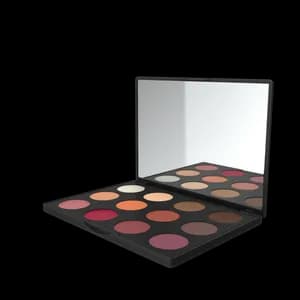
Eyeshadow Palette with Mirror
The Eyeshadow Palette with Mirror offers a versatile range of eyeshadow shades for creating stunning eye looks. With a built-in mirror, it's convenient for on-the-go makeup application.
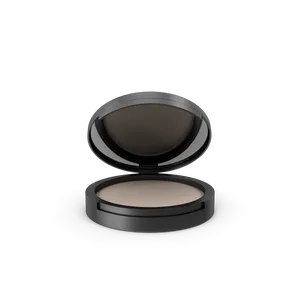
Powder Canister
The Powder Canister is a finely milled setting powder designed to set makeup and control shine. With a lightweight and translucent formula, it provides a smooth and matte finish.

Red Lipstick
The Red Lipstick is a classic and bold choice for adding a pop of color to your lips. With a creamy and pigmented formula, it provides a vibrant and long-lasting finish.
This hole fetches data Dynamically.
The "Shell" Paradox
How can the navigation be static if we don't know the user context?
1. Static at BUILD Time
Next.js renders your Structural Skeleton into a physical file during the build.
2. Served by CDN at Request
The CDN sends that skeleton instantly. The server then streams the "Contextual Reality".
The Dynamic Triggers
cookies()Reading cookies for auth.
headers()Accessing request headers.
searchParamsThe URL query string.
cache: 'no-store'Disabling caching.
revalidate: 0Forcing bypass.
unstable_noStore()Explicit opt-out.
Why use it if it's experimental?
PPR provides massive TTFB improvements for high-scale apps.
Wait, don't Layouts already persist?
Yes, but standard SSR still makes the browser wait for the server to generate that layout.